
Introduktion
Började som idé att ge lite mer specifik information runt MyFitnessPal (“MFP”, förkortning av J&P) med eftersom sidan är lite mer inriktad på både svenska användare nu och oss själva i framtiden så blev fokus ganska omedelbart bredare. Med ambition att täcka också andra appar.
F.n. mer en start alltså.
Översikt olika applikationer
En början, några stycken hittade i en första sökning om alternativ till MyFitnessPal
- Lifesum
- MyFitnessPal – mer nedan
- nutris
- nutris.se
- SE App Store: Nutris, apps.apple.com/se/app/nutris/id955117435
- US App Store: Nutris, apps.apple.com/us/app/nutris/id955117435
- nutrola
- nutrola.se
- Har ett blogginlägg om MFP, en konkurrent till dem: MyFitnessPal på svenska – vad appen kan och vad den saknar för svensk mat, blogg, 2026-08-05
nutrola.se/blogg/myfitnesspal-pa-svenska-vad-appen-kan-och-vad-den-saknar-for-svensk-mat/?utm_source=chatgpt.com - SE App Store: Nutrola: AI-kaloriräknare, apps.apple.com/se/app/nutrola-ai-kalorir%C3%A4knare/id6752298588 (3,9 av 5, 2026-11-03)
- US App Store: Nutrola: AI Calorie Counter, apps.apple.com/us/app/nutrola-ai-calorie-counter/id6752298588 (4.5 av 5, 2026-11-03)
- App Stores, generellt
- SE App Store: apps.apple.com/se/iphone/
- US App Store: apps.apple.com/us/iphone/
🇸🇪
Resurser för generell information
Myndigheter och andra organisation som inte säljer produkter, mer fokus på data, vetenskap
- näringsdeklaration
- varudeklaration
MyFitnessPal
Om MyFitnessPal
- Hemsida: myfitnesspal.com (ingen svenskanpassning/val, ingenting på svenska eller i Sverige, vad hittat Nov 2026)
- J&P började kolla in appen och skapade konto redan 2014.
- Varit lite till-och-från användare över åren beroende på egna fokuset på hälsa och att “äta rätt” osv.
- Plockat upp användning mer rejält igen hösten 2026 med nu daglig användning
- Premium, betalda planer (2st, $80/år, per person, ingen “Family Sharing”)
- Fördelar:
- Enkel att använda och ger bra översikt av att hålla reda på kalorier, carbs, fat, protein, and ‘all the other details’
- Enkelt att sätta upp mål, t.ex. max 1800 kalorier per dag
- Mycket bra streckkodsläsaren (mycket få saker inte hittats än)
- Inklusive hittills alla svenska varor vi har – olika hårdbröd (finns på HEB), olika kaviar, t.o.m. surströmming (foto nedan).
- Tyvärr måste man tydligen numera betala för Premium för att få tillgång till streckkodsläsaren / Barcode scan.
- I mycket “good enough” för att just hålla reda på detaljer runt vad man sätter i sig.
- Nackdelar:
- Kass – pissdålig – på att hantera matrecept (Ok, är inte en matrecepthanterare men ens försöken att hantera är undermåliga), inga bra sätt att dela information mellan familjemedlemmar
- Strula med (eng.) Meals, Diary, Friends, Copy (och allt under en viss grupp – Breakfast, Lunch, Dinner, Snacks)
- Mycket amerikansk i mått, och mått- och hantering av ingående näringsämnen i varor…
- Gu vad saknar svensk och europeiskt standardisering… SI systemet, näringsdeklarationer med “allt och alla per 100 g”
osv. (I USA är dessa betydligt knepigare att använda, både om man vill “dela upp” en vara, bara använda en del, eller jämföra olika varor, eftersom 1 portion av en vara kan vara väldigt olik en annan varas “portion”-storlek)- En artikel med info om etiketter lite runt om i världen är Nutrition facts label – en.wikipedia.org/wiki/Nutrition_facts_label
- I appen kan man se en mängd olika val, beroende på varor och vem/varifrån data kommer ifrån, t.ex.
- i oz (ounce, 28.34952 g), lb (pounds, exactly 0.45359237 kg)
- i fl oz (fluid ounce, British fl oz = 28.4130625 ml, US fl oz = 29.5735295625 ml)
- “1 cups16”, …
- Men också i gram, mer inte alltid, och då kan man behöva räkna om “jag tog 100 g böner från burken som innehåller ca 3.5 servings, one serving is 0.5 cups, and contains 100 calories per serving”.
- Masochister kan roa sig mer på en.wikipedia.org/wiki/Imperial_units och en.wikipedia.org/wiki/United_States_customary_units
- Gu vad saknar svensk och europeiskt standardisering… SI systemet, näringsdeklarationer med “allt och alla per 100 g”
- Användargränssnitt är lite hit-and-miss
- Bra översikt av vad man får i sig, hur hantera lägga till mat, och så
- Menyn för profil osv är dock en katastrof, väldigt lång och man måste skrolla för mycket, t.ex. “Friends” (om vill ge sig in på att göra någon form av dela-inom-familjen)
- Kass – pissdålig – på att hantera matrecept (Ok, är inte en matrecepthanterare men ens försöken att hantera är undermåliga), inga bra sätt att dela information mellan familjemedlemmar
- Integration med andra appar
- Fundersam på räknar steg… Inte utrett än (Task MFP2610S)
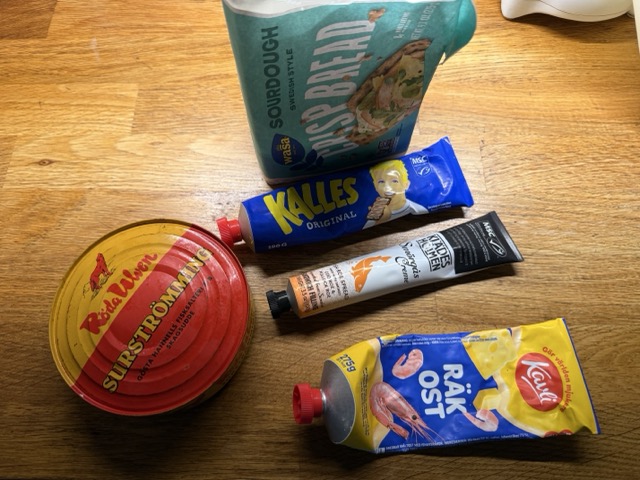
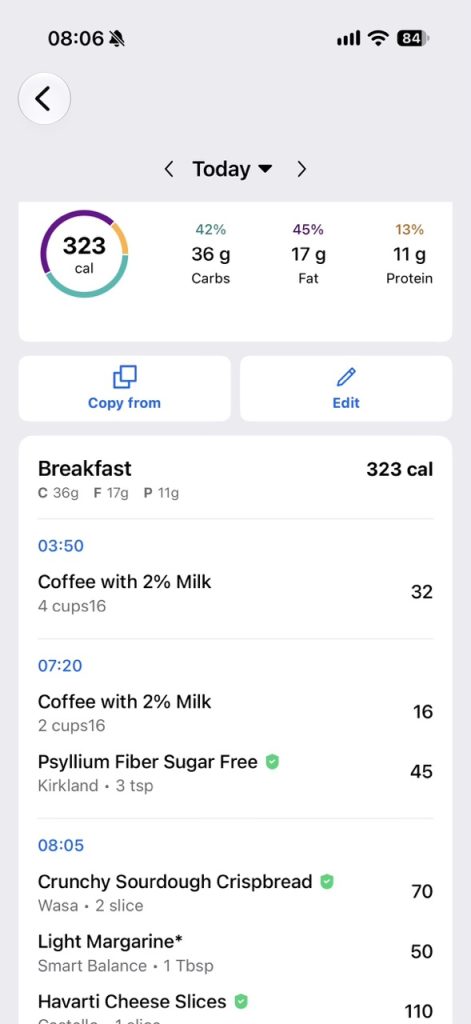
323 calories, 36 g carbs, 17 g fat, 11 g protein
ChatGPT 2026-11-02
Q: Är myfitnesspal användbar i Sverige
A:
Ja! MyFitnessPal fungerar absolut i Sverige, och du kan använda appen på svenska. Men det finns några saker som är bra att känna till.
MyFitnessPal
Tillgänglig i Sverige
- Svenska som språk
- Kalori- och näringsregistrering
- Träningsdagbok
- Sökning efter livsmedel
- 4,4/5 i svenska App Store – apps.apple.com/se/app/myfitnesspal-kalorir%C3%A4knare/id341232718
Vad fungerar bra i Sverige?
- Du kan registrera svenska maträtter och livsmedel.
- Du kan lägga in exempelvis havregryn, kvarg, knäckebröd, potatis och köttfärs.
- Du kan följa kalorier, protein, kolhydrater och fett.
- Du kan lägga in egna livsmedel om något saknas.
Vad är mindre bra?
- Databasen är inte helt anpassad efter svenska livsmedel.
- Vissa svenska märken och produkter saknas.
- Streckkodsläsaren kräver Premium.
- Du kan behöva kontrollera näringsvärden manuellt.
Mitt tips
Om du bor i Sverige och vill ha en app för att hålla koll på kalorier och protein skulle jag även jämföra med Lifesum som är en svenskutvecklad app.
Vill du främst använda appen för att gå ner i vikt, bygga muskler eller bara hålla koll på kalorier och protein? Då kan jag rekommendera vilken app som passar bäst.
Brave, AI, 2026-11-03
search.brave.com/search?q=%C3%A4r+myfitnesspal+bra
Prompt: är myfitnesspal bra
Ja, MyFitnessPal anses generellt vara ett bra och pålitligt verktyg för kalori- och näringsuppföljning, särskilt för nybörjare eller de som vill ha en omfattande livsmedelsdatabas. Appen har hög användarpoäng (4,7/5 på App Store) och anses effektiv för att skapa medvetenhet om kostvanor och stödja viktnedgång genom enkel logging.
De främsta styrkorna är den stora livsmedelsdatabasen, brett stöd för enhetssynkronisering (Apple Watch, Garmin, etc.) och en aktiv community. Många användare uppskattar appens enkelhet och att den fungerar över plattformar (iOS, Android, web).
Det finns dock vissa nackdelar som bör beaktas:
-
Begränsningar i gratisversionen: Vissa funktioner, som streckkodsläsaren, har flyttats till den betalda Premium-versionen, vilket frustrerar vissa användare.
-
Användargränssnitt: Vissa recensenter och användare upplever att gränssnittet är lite föråldrat eller att nya uppdateringar gjort navigeringen mindre smidig.
-
Begränsad träningsplanering: Appen fokuserar starkt på kost, men erbjuder mindre personliga träningsprogram jämfört med dedikerade träningsappar.
Sammanfattningsvis är MyFitnessPal värt det om du främst behöver en pålitlig kaloriräknare med bra integrationer. Om du värdesätter en modern design, gratis streckkodsläsare eller avancerade träningsplaner kan alternativ som Lose It! eller Cronometer vara bättre lämpade.
Promp: någon svenska hemsida eller annat
The easiest way to share recipe nutrition within a family on MyFitnessPal is by creating a Custom Recipe and sharing the generated direct link, which allows family members to save and log the meal directly in their own accounts without manual data entry.
For creating and sharing the recipe:
-
Navigate to More > Recipes & Meals and select Create a New Recipe.
-
Enter all ingredients with precise quantities and specify the total number of servings to ensure accurate per-serving nutrition data.
-
Save the recipe, then tap the Share icon (or three dots) and select Copy Link to send via text or email.
For family members to use the recipe:
-
Open the Link: Family members tap the shared link on their device with the app installed.
-
Save to Library: The app prompts them to Save to My Recipes, adding it to their personal list for future logging.
-
Log Meals: They can then simply select the recipe and enter the number of servings they ate to automatically track nutrition.
Alternative for shared cooking sessions:
If family members are cooking together and want to log the same meal simultaneously, they can enable Diary Sharing in settings. One person logs the meal, and the other uses the Copy to Date feature from their friend’s diary to duplicate the exact nutritional breakdown instantly.
ChatGPT, AI, 2026-10-23 – MyFitnessPal and Recepi Managers
[chatgpt.com/c/6adb9ef7-35ec-83ea-a870-4458c15f063e]
Prompt: Using myfitnesspal to track calories etc, any easy way to sharing/get info from recipe – solution such as Samsung Food app?
ID: 20261023125400
Yes. There are several ways to get recipes into MyFitnessPal (MFP) without manually entering every ingredient, and Samsung Food (formerly Whisk) is one of the interesting options.
The key distinction is between three functions:
Importing recipes from websites, apps, or your own collection.
Calculating nutritional information — calories, protein, carbohydrates, fat, etc., per serving.
Transferring the recipe or nutritional information into MyFitnessPal, so you can log what you’ve eaten.
The third step is often the tricky one. An app can be excellent at importing recipes without supporting direct transfer to MyFitnessPal.
Practical options
| Method | Import recipes | Nutrition calculation | Easy logging in MFP |
|---|---|---|---|
| MyFitnessPal recipe importer | Website URL or ingredient list | Yes | Direct |
| Samsung Food | Websites, saved recipes | Yes, depending on recipe/features | No confirmed direct sync |
| Paprika Recipe Manager | Websites and personal recipes | Not its main strength | Manual transfer |
| Cronometer | Custom recipes | Yes, detailed nutrients | Separate tracking app |
What I’d recommend
Start with MyFitnessPal’s built-in importer. Its September 2026 documentation confirms that both iPhone and Android support importing recipe URLs and bulk ingredient lists. This is available in the free version.
MyFitnessPal Help+2
On your iPhone, open MyFitnessPal → My Meals, Recipes & Foods → Recipes → Create a Recipe → Add from the Web.
If you want to maintain a proper recipe collection with cooking instructions, pictures, shopping lists, and meal planning, Samsung Food is worth considering as a separate recipe manager. But I would not assume it can automatically send complete recipes to MyFitnessPal.
One other useful detail: MyFitnessPal still doesn’t support directly sharing your saved recipes with another MFP account. However, another person can copy a logged meal from your shared food diary.
MyFitnessPal Help
One question
Which of these is closest to what you’re trying to accomplish?
Explore this solution
ID: 20261023160000
The easiest way to share a recipe with a family member using MyFitnessPal is through Diary Sharing.
Unfortunately, MyFitnessPal still doesn’t support directly sharing a saved recipe between accounts. But there’s a fairly simple workaround.
MyFitnessPal Help
On your iPhone:
Make sure you and your family member are Friends in MyFitnessPal.
Go to Settings → Privacy Center → Sharing & Privacy → Diary Sharing.
Select Friends Only.
Add your saved recipe to your food diary for a particular day.
On your family member’s iPhone:
Open More → Friends.
Select your profile.
Tap View Diary (book icon).
Find the meal containing your recipe.
Tap the three dots (•••) → Copy to Date.
Choose the date and meal.
The recipe’s nutritional information is now copied into their diary.
MyFitnessPal Help+1
Important limitation
| What you want | Supported? |
|---|---|
| Share calories and nutrients from your recipe | Yes |
| Family member logs the recipe in their diary | Yes |
| Transfer recipe into their saved Recipes collection | No |
| Share the full ingredient list as an editable recipe | No |
| Automatically synchronize recipes between accounts | No |
My recommendation: If you’re both tracking calories and frequently eating the same homemade meals, use Diary Sharing. It avoids entering ingredients twice.
If your goal is instead to maintain a shared family recipe collection, where either person can edit recipes and both can log them in MyFitnessPal, Samsung Food or another recipe manager may be a better starting point.
ID: 20261023160000
In MyFitnessPal, not the iPhone’s Settings app.
According to MyFitnessPal’s February 2026 instructions:
Open MyFitnessPal.
Tap More (bottom right). If there’s no More button, try your profile icon (top right).
Tap Settings.
Look for Sharing & Privacy, possibly under Privacy Center.
Tap Diary Sharing.
Select Friends Only and save.
MyFitnessPal Help+1
These are MyFitnessPal settings, so iOS 27 itself shouldn’t determine their location.
If you don’t see Privacy Center or Sharing & Privacy, tell me what options you actually see under MyFitnessPal → Settings. I’ll work from your actual interface rather than guessing further.
ID: 20261030164400
MyFitnessPal’s recipe importer searches for recipes by accessing public recipe websites, rather than searching a single centralized recipe database.
There are two different places involved:
Recipe websites — where MyFitnessPal retrieves ingredients and instructions.
Your personal MyFitnessPal recipe collection — where imported or manually created recipes are stored.
Yes, you can create and store your own recipes in MyFitnessPal, but that doesn’t automatically make them available for other people to find or import.
Where recipes come from
| Source | Can MFP import it? | Can you store your own recipes there? |
|---|---|---|
| Public recipe websites | Yes, via URL | Yes, if you publish on a website |
| MyFitnessPal Blog | Yes | No |
| MyFitnessPal Recipe Discovery | Built-in browsing/logging | No, curated collection |
| Your MFP Recipe Box | Already stored in MFP | Yes, private recipes |
| Samsung Food | Potentially, via a public recipe URL | Yes, in Samsung Food |
MyFitnessPal also has a separate food database, where you can contribute your own foods. On its website, the recipe creation interface offers an option to share with the MyFitnessPal recipe database, although that should not be confused with sharing an editable recipe directly with a family member.
MyFitnessPal Help+1
How to create your own recipe on iPhone
Open MyFitnessPal → Profile icon → My Meals, Recipes & Foods → Recipes → Create a Recipe.
Choose either Add from the Web or Enter Ingredients Manually. The latter supports pasting an entire ingredient list, making it relatively easy to enter homemade recipes.
MyFitnessPal Help
Best approach for your family
Given your earlier goal of sharing recipes between family members, I would consider keeping the master recipes in a shared recipe manager, with MyFitnessPal used primarily for nutrition tracking.
One potentially convenient solution is to store recipes at a public URL, so each family member can import the same recipe independently into MFP. Whether a Samsung Food recipe URL works reliably with MFP’s importer would need testing.
The important distinction is that MFP is good at calculating and logging recipes, but considerably less convenient as a shared family cookbook.
ID: 20261030164400
In the MyFitnessPal website, here’s exactly where:
Open MyFitnessPal and sign in.
Click Food in the top navigation.
Click the Recipes tab.
Look for Import Recipe on the right side of the page.
Paste the recipe’s URL into the field at the top.
Click Import Recipe.
Review the ingredients, set the servings, and click Save.
The imported recipe will appear in Your Recipe Box.
Verified against MyFitnessPal’s official instructions, updated September 29, 2026.
MyFitnessPal Help+1
Important: The URL importer is available on the English-language version of the website. If you see Enter New Recipe, that’s the manual recipe editor, not the URL importer.
end of page