
Service (older) Quick Action (newer): A workflow that you can add to Finder windows, the Touch Bar, and the Services menu. For more information about using Quick Action workflows, see Use Quick Action workflows on Mac.
See also MacDev! MacOS! Development (jandp.biz/is/dev/sw/macdev/) for important notes around problems around Security.
Contents
Services, Workflows – Automator-based (macOS)
Common pattern
In many cases, start with writing a shell script / command line interface (CLI) tool/executable, then create some small wrapper code for GUI use in applications / Finder.
I.e.
- Implement core functionality in CLI tool, e.g. mime-tool-by-j.sh
- That can be used in terminal – gred for both development, using flags for verbose outputs, et c, as well as actual use when anyway down there in terminal windows.
- Save such in $HOME/bin/ (a subdirectory I’ve had a habit to alway have since maybe around early 1990s on every computer worked with)
- Wrapper: as appropriately.
Creating a Quick Action in Automator app, e.g. Save Web as mhtml J- Quick Action to make tool available via
- <App> menu under Services> submenu
- As applicable (depending on functionality, how tool has been implemented) possibly in
- Finder’s popup menu under Quick Actions, OR
- Finder’s popup menu under Services
which depend on generation of macOS….. NOT the best solution and Apple should fix this….!!!
- Most often writing most of code in AppleScript but it happens using other means like bash
- Tool that in turn call CLI utility, e.g. mime-tool-by-j.sh
- Quick Action to make tool available via
Gotchas / Issues
- General: Often start a new script/tool based on some existing, AND OLD code for copied tool may still be around, which can be confusing… NOTE: most scripts created are ONLY intended for my personal use.
- And in many cases lots of Work In Progress until a more stable set of pieces works well.
- Time that can be months, as lots of work is done when get focus for some period.
- CLI-tools
- Such may be using commands that are not standard macOS but downloaded in various ways over many years and lost track if standard or added by myself, and also where such may be stored
- via applications (code within apps that are ‘re-usable’ / can be used via CLI/scripts)
- brew … (and other download managers)
- python ecosystem – yeah…. that also happens, and opens up THAT area of quagmire.
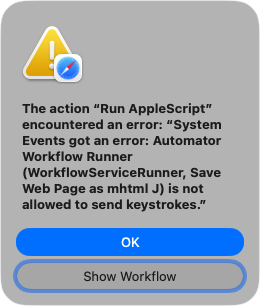
- AppleScript: keystrokes (e.g. of areas of issues)
- Controlling applications via AppleScript can be really messy when get into some more advanced things like controlling dialogs.
- Must give apps rights via System Settings > security … (don’t remember exactly what to do where just now….)

- More below in Troubles-Problems section below.
That’s it for now – more a starting point of potential issues.
Scripts! by J
❓⚠️ ✅
2026-09-29: Started including info related to macos 27.
2026-10-03: Started using color indications to highlight DISCONTINUED #ffcfcf, verified working (macOS27) #d7fcac,
| col 0 | Product, What | Type | External(s) | Current ver info |
macOS 27 |
|---|---|---|---|---|---|
| (1) | Activity Monitor – check for … suite | Application | 2026-01 | ||
| (2) | Audible Etc DRM JS | Service | bash-script | 2024 | |
| automator-cleaner-js (bash, 2025-10-17) | CLI script | bash-script | 2026-01 | ||
| AutoTrash! AutoTrash by J, TrashIt! WIP–NOT-FINISHED | Service, Quick Action | WIP | |||
| (DISCONTINUED 2026-07-23, after some 9 years of use; v1 2017-08, now replaced by FolderActionsBashJ.) | |||||
| check-change-js.sh script | CLI script | – | |||
| chmod util, for unzipped zip archives etc | CLI script | – | |||
| cloudfilestatus-js.sh scripts | CLI script | 2026-06; v1.0 | |||
| convert_mp4_to_m4a.sh script | CLI script | 2025-04; v1.0 | |||
| Copy Path as Text J | Service, Quick Action | 2025-11; v1.0 | |||
| Count Apps & Windows CAW! (R&D) | Application | 2024-11; v2.2 | ✅ Got dialog: ‘“Count Apps & Windows App J CAW v2.2.app” wants access to control “System Events.app”. Allowing control will provide access to documents and data in “System Events.app”, and to perform actions within that app.’ Answered: Allow. And it works! |
||
| create disk image | Service | ||||
| daytime-js.py script | CLI script | ||||
| Dropbox-Mover-J.workflow (Folder Action) | Folder Action | 2026-04; v1.0 | |||
| Email Archive2FS, Email-related Automator-Services Emails!
Email Low-level Msg Info (originally ‘Low-level Email Msg Info’) |
set of tools
workflows / services + one ‘core’ (app in v5) |
2026-04; v4.3 2026-09; v5.0 |
⚠️ Got into problems (with both Full Disk Access and controlling system, and running find terminal command) and got quite messy research, discussing w/ ChatGPT, and eventually ended up a major rewrite (2026-09-24+25), from workflow to application, as the latter CAN be given access rights. NOT A TRIVIAL CHANGE Apple has done in the background….. ✅ v5 gen works – thank god could fix it, very frequently used. |
||
| Email Stats J | Service, Quick Action | ⚠️ Broke in macOS27 (not fixed yet, per 2026-10-03. ###TODO) | |||
| eml to html script eml! html! | |||||
| emlx-to-eml-by-j emlx! eml! Quick Action | |||||
| File System Tests, J | |||||
| Finance Tagger by J | |||||
| find-apps-js.sh script | |||||
| Finder Windows Utility | |||||
| Folder Actions! info, scripts | |||||
| (DISCONTINUED 2026-07-23, after almost 2 years of use; v1 2024-04-05..v2.2 2026-07-23 but then replaced by FolderActionsBashJ.) | |||||
| folder_organizer_by_j.sh bash script | CLI script | v1.1 2026-10-04 | ✅ Works fine in macOS27 (v1.0 2026-07-29) (ONE tool that can be use in FolderActionsBashJ.workflow v1.0 2026-07-29 impl “1level” AND “3levels”) |
||
| FolderActionsBashJ.workflow | Folder Action | v1.1 2026-10-04 | ✅ Works fine in macOS27 (v1.0 2026-07-28) (FolderActionsBashJ 2026-07-28+ replaces ‘Camera Uploads’ and ‘Folder Organizer J Folder Organizer’) |
||
| Get Info – Quick Action (2021-10) Get Info! | |||||
| Get Info by J, Info by J | |||||
| Go Finder n! Desktop. Downloads, Documents, Dropbox … Open Finder … | |||||
| GPS Utility by J! gpsutil-js.sh! GPS Utility by J.workflow gpsutil-js.sh |
Quick Act. CLI script |
v1.1 2025-07-15 v1.1 2025-07-15 |
✅ Works in macOS27 | ||
| GPX! gpxparser! alias | |||||
| Hash It by J | |||||
| hellow-j.sh bash script | |||||
| iCloud-Drive-Mover-J.workflow (Folder Action) | Folder Action | ||||
| Image manipulations | |||||
| JImage scripts services -rotate images, shrinking | |||||
| macosperf.sh! | |||||
| Make Alias! scripts | |||||
| Make Image from Folder J – macOS Service (make-dmg-j.sh WIP) | |||||
| mdfind-js.sh script | |||||
| mediafilenamefix-js.sh and MediaFilenameFix-JS SH! | |||||
| MediaInfo! Media Info! MediaStats! by MLabs | |||||
| MediaProcJ | |||||
| MTJ, MediaTranscodeJ..: MediaTranscode J mediatranscode-js.sh |
Workflow CLI script |
v1.2 2026-08-17 v1.1 2026-08-17 |
✅ Works in macOS27 | ||
| MFJ, MediaFixerJ: MediaFixerJ.app mediafixer-js.sh |
App CLI script |
v1.0 2026-10-02 v1.0 2026-10-02 |
✅ Works in macOS27 | ||
| mime-tool-by-j mime! | |||||
| mlabschecker.sh script | |||||
| mlabstexts.sh script | |||||
| Move Items to Downloads | Folder Action | ||||
| MS-Ergo4000-… | |||||
| Music-related; Find Missing J (Apple app); music-util-by-j.sh bash | |||||
| Navionics-exports-processing! | Folder Action | bash-script | |||
| New Disk Image with Selection – OLD | |||||
| New Folder – Service | |||||
| New Note in TextEdit J (Quick Action, Services) | |||||
| New Text File – Service | |||||
| Open Hazel.app – tell application “Hazel” to activate | Implementation 2 2026-10-03 | ✅ i2 (implementation #2) 2026-10, Bash script – based app, to work in macOS27 ⚠️ Implementation #1 2026-04, AppleScript-based app failed in macOS27 and can’t even open app for modifications……. |
|||
| Open in Terminal | v1 2016 | ✅ Works in macOS27 | |||
| Open Slack App.app | v1 2026-06-03 | ✅ (2026-10-03) got to work in macOS27 after some “twiddling around” Calendar app, and open-resave identical app code inside Automator and it get it to start working as expected. ⚠️ Didn’t work at first, did NOT trigger opening Slack app even if entries in Calendar where there, unmodified, which has been working since Jun 2026. | |||
| Open URL in … | |||||
| Paths-related things (file systems, …) | |||||
| Pushover! Pushover- Simple Notifications for Android, iOS, and Desktop alias | |||||
| RWTS-PDFwriter File Mover Folder Action | Folder Action | ||||
| Save PowerPoint as PDF | |||||
| Save Web Page as mhtml J | v2.0 2026-05-18 | Quite powerful, but also complex and a bit sensitive, thingy… ⚠️ ✅ Works in macOS27 |
|||
| Folder Action | (bash script, from 2018, but inside FA) | 2026-04, v26 | DISCONTINUED use❗️Not using (Sep 2026) as moved over to using Clean Shot product for screenshots. Prior notes: v26 gen 2026-04-09 (w Quick Action AND bash-script inside). Apr 15 2018 ./Screenshot-Filename-Cleaning-FolderAction.workflow/screenshotscleanfilename.sh |
||
| Set Icon by J SetIcon! | |||||
| Special Key Handler … (MS Ergo 4000 kbd) | ✅ Works in macOS27 w/o any tweaks – thank god, critical tool for the best keyboard ever. (MS-Ergo4000-Go-Backward-key, MS-Ergo4000-Go-Forward-key, MS-Ergo4000-Mail-Key, MS-Ergo4000-Search-Key-DUMMY, MS-Ergo4000-Search-Key, MS-Ergo4000-Web-Key, MS-Ergo4000-Zoom2-Minus-key, MS-Ergo4000-Zoom2-Plus-key) |
||||
| Spotlight Search shortcut | |||||
| Tag Finder Items | Folder Action | 2026-05; UT | (UT: Under Test) | ||
| Time Difference J | |||||
| Toggle Play user interface sound effects | |||||
| videodownloader-js! ( yt-dlp-js! CLI yt-dlp! ) | |||||
| WindowArrange-Archive J | Service, Quick Action | v1.6 2026-10-03 Changed DOCK height handling | ✅ in macOS 27 after tweak for handling window items sizes more reliably (not related to macOS) (v1.5 2026-07-29 Hide Sidebar also in Finder, CR270723-1) |
||
| WindowReopen by J (WRbJ!) WR! (appl.) | Application | (with a companion Service) | v1.3.1 2025-10-08 | ✅ works in macOS 27 – thank god, very frequently used | |
| WindowReopen by J (WRbJ!) WR! (srv) | Service, Quick Action | (with a companion Application) | v2.2 2026-03-30 Brave Browser, some cleanups, performance improvements | ✅ works in macOS 27 – thank god, very frequently used | |
| xdone.sh! script | |||||
| yt-dlp-js .. see videodownloader-js! ( yt-dlp-js! CLI yt-dlp! ) alias | |||||
| Zoom+, Zoom-, Forward and Backward keystrokes handlers alias |
Troubles / Problem Areas
Access – Security Limitations, Restrictions
‘Assistive Access’
- General:
- Scripts, programming level:
- search.brave.com/search?q=what+is+%22assistive+access%22+when+scripts+requires+such
- To grant this permission, users must navigate to System Settings (or System Preferences) > Privacy & Security > Accessibility and check the box next to the specific application running the script. (macOS 26)
- macOS27: System Settings > Privacy & Security, then look for Device Control and Data Access in the list — that’s where the app-level accessibility/keystroke permissions now live.
General research
search.brave.com/search?q=macOS27%2C+for+Automator+Service%2C+how+to+allowed+assistive+access
Granting assistive access directly to an Automator Service is often problematic because services are saved as workflows, which macOS does not allow to be selected in the Accessibility list. To resolve this, you must use a workaround that involves creating a standalone application or authorizing the underlying system agents.
1. The Standalone Application Workaround (Recommended)
The most reliable method is to decouple the automation logic from the service trigger:
-
Open Script Editor and paste your AppleScript code.
-
Export the file as an Application (File > Export > File Format: Application).
-
Sign the app locally if prompted (“Sign to Run Locally”).
-
Go to System Settings > Privacy & Security > Accessibility and add this new standalone application to the list.
-
Create your Automator Service to use the “Run Application” action, pointing it to the standalone app you just created.
2. Authorizing System Agents
If you must run scripts directly within an Automator workflow, you may need to authorize the system processes that execute them:
-
Navigate to System Settings > Privacy & Security > Accessibility.
-
Unlock the pane with your administrator password.
-
Add Automator, Script Editor, and AppleScript Utility (located in
/System/Library/CoreServices/) to the list. -
For Quick Actions specifically, you may also need to add ServicesUIAgent. Locate it by using the path input (Shift-Command-G) and navigating to
/System/Library/CoreServices/, then selectServicesUIAgent.app.
3. Troubleshooting Permissions
If permissions do not take effect immediately:
-
Toggle Permissions: Turn the accessibility checkbox off and on for the relevant apps, then quit and reopen System Settings.
-
Target App Permissions: Some users find success by adding the target application (the app being controlled, e.g., Chrome or Finder) to the Accessibility list, rather than Automator itself.
-
Reset Privacy Database: As an advanced step, you can clear the privacy database using the Terminal command:
tccutil reset Accessibility.
Full Disk Access
See Privacy & Security > Full Disk Access (In upper section of items in right side.)
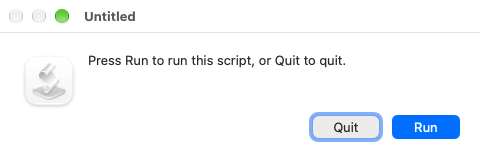
Control key… “Press Run to run this scropt, or Quit or quit.” – dialogs
SOLUTION/WORKAROUND: Be quick when use shortcut keys combination, don’t hold the Space key for long.
NOT seen earlier, or at least for many, many, years as can’t remember ever seeing BUT started getting dialogs now in Sep 2026:
- When trigger services using keyboard, e.g. Command+Control+Space+S,
- in a (due to macOS 27) rewritten family of scripts (app, using Script Editor)
- in macOS 27 – in which I strongly suspect something pertinent has been changed behind the scene
More research:
- search.brave.com/search?q=%22Untitled%22%2C+%22Press+Run+to+run+this+script%2C+or+Quit+to+quit.%22
- “Press Run to run this script, or Quit to quit.” discussions.apple.com/thread/253878258?sortBy=rank
I.e., it seems to be something that has been around ‘for ever’.
EoP