
This page contains general information about this particular keyboard. See /is/macos/keyboards/ for more including configuration of keyboard shortcuts.
Microsoft Natural Ergonomic Keyboard 4000 – the world’s best keyboard ever (J&P).
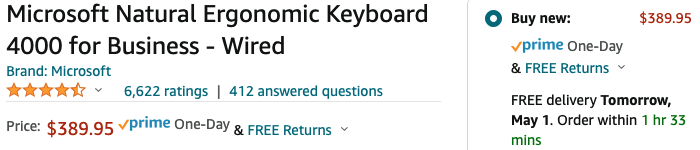
Discontinued since many years (when extended this topic in April 2022) but can still be found at Amazon, Though not cheap – supply and demand … the wired Ergo 4000 variant at some US$ 390 and the wireless Ergo 7000 package at US$ 769 (Apr 2022).
The Microsoft Natural Ergonomic Keyboard 4000 is a wired USB keyboard introduced in September 2005 and discontinued in 2019, designed with a split ergonomic layout to promote natural wrist alignment and reduce strain.
It features a 14-degree gable, curved key bed, and an integrated cushioned palm rest to encourage a comfortable typing posture, along with a removable front stand for adjustable negative tilt. The keyboard includes 104 keys (Retail) or 109 buttons (Business), multimedia controls, a Zoom Slider, and five programmable “My Favorites” keys.
While originally priced at $64.95 (approx. $107 in 2025), the keyboard is now sold as refurbished or used, with current listings ranging from $139.99 to higher prices due to collector demand.
| Compatibility | Windows (XP through 10), Mac OS (10.2x–10.4x) |
Pros and Cons
-
Positives: Integrated palm rest, adjustable tilt, 3-year warranty, and plenty of programmable keys for productivity.
-
Negatives: Space bar is often reported as noisy and hard to depress, and the minimal split may not prevent Carpal Tunnel for all users.
-
Current Status: No longer manufactured; users often seek refurbished units from third-party sellers.
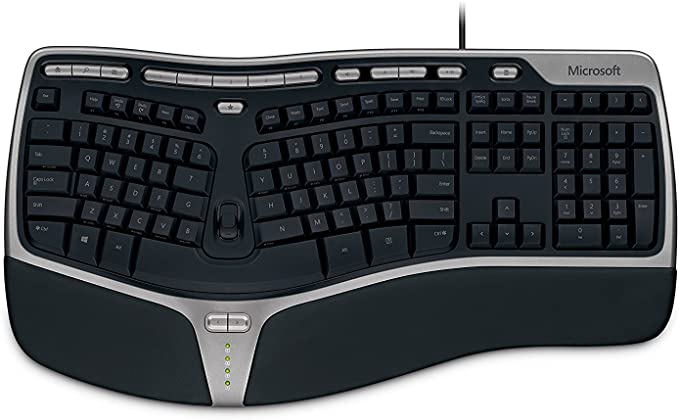


| Category of Keys | Count | Comments |
| Standard keys | 47 | Alphabetical, numeric, special characters (!@#…) |
| Above -“-; Func keys, F1..F12+ F Lock | 13 | F-keys ON: F1, F2, … F12 F-keys OFF: Help, Undo, …Print |
| Right of -“-: PrtScn, ScrLk, Pause/Break | 3 | |
| Left side: Esc, Tab, Caps Lock, Shift, Ctrl, Win, Alt | 7 | modifier keys |
| Right side: Backspace, Enter, Shift, Alt, Menu, Ctrl | 6 | modifier keys |
| Center: Insert, Home, Page Up, Delete, End, Page Down | 6 | Insert or type-over; navigation keys |
| Nav keys: Up, Down, Left, Right | 4 | More navigation keys |
| Numeric kbd section | 17 | for faster numeric entries, calculations, calculator app use |
| Above -“- (=, (, ), arrow) | 4 | -“- |
| At top of kbd: 3 app keys: Web/Home, Search, Mail, 5+1 Fav: 5 Fav Keys + My Favorites key, 3 Sound: Sound On/Off, Sound Decrease, Sound Increase, 1 Media: Play/Stop 1 Calculator key |
14 | See /is/macos/keyboards/for configuration of keyboard shortcuts. |
| Bottom of kb: Backward, Forward | 2 | See /is/macos/keyboards/for configuration of keyboard shortcuts. |
| Sum, total no of keys | 123 | |
| PLUS, one Zoom slider, up, own |
Special Key Handler
‘Top 1’ – Top left
- ‘Web/Home’
- ‘Search’
- ‘Mail’
‘Top 2’ – The 5 Favorites keys plus My Favorites ‘admin’ key
- ‘Favorite 1’
- ‘Favorite 2’
- ‘Favorite 3’
- ‘Favorite 4’
- ‘Favorite 5’
- ‘My Favorites’
‘Top 3’ – Media
- Mute
- Volume Down
- Volume Up
- Play/Pause
‘Top 4’
- ‘Calculator’
Second Row, Group 1
- Esc
Second Row, Group 2, Function keys
- ‘Help’
- ‘Undo’
- ‘Redo’
- ‘New’
- ‘Open’
- ‘Close’
- ‘Reply’
- ‘Fwd’
- ‘Send’
- ‘Spell’
- ‘Save’
- ‘Print’
- ‘F Lock’
Second Row, Group 3,###
- ‘PrtScr’, ‘SysRq’
- ‘ScrLk’
- ‘Pause’, ‘Break’
Bottom of keyboard, below space, a bit forgotten
- ‘Backward’
- ‘Forward’