
Starting page for an issue that has been bugging me since beginning of April 2026, when upgraded to macOS 26.4.
Been busy and have had limited time to dig into detailed troubleshooting as problem does NOT show when on VPN.
Problem is can’t be on VPN all the time as banks, and a number of other sites for that matter, complaints and doesn’t work when detected on is using VPN… I.e. it’s sometimes a daily on-off switching of VPN use.
Contents
- 1 OWN SUMMARY
- 2 RESOURCES
- 3 SOLUTIONS
- 4 FROM CHATGPT
- 5 1. Executive Summary
- 6 2. Environment
- 7 3. Symptom Characterization
- 8 4. Experiments Performed
- 9 5. Findings
- 10 6. Eliminated Hypotheses
- 11 7. Remaining Hypotheses
- 12 8. Architectural Interpretation
- 13 9. Why the VPN Matters
- 14 10. Recommended Engineering Actions
- 15 11. Confidence Assessment
OWN SUMMARY
- ⚠️ On ‘raw’ GFiber, and GUI env. (macOS Finder): frequently getting “Preparing to move”… dialogs
 But dialogs can show up at all sorts of operations, as long as involving Finder, Dropbox, and ‘raw’ GFiber
- Copy or move files to AND from local volume to Dropbox-handled
- Deleting, moving to trash, items on Dropbox-handled area
- Quick Look (the macOS feature) – viewing of files gets very slow, takes time to show content
- Never when
- Using command line interface (CLI) commands ✅, ONLY see problem when using graphical user interface (GUI, macOS Finder) ⚠️.
- There is something with Finder, Dropbox, and GFiber ⚠️
- Looks like something in Finder-Dropbox interactions/handshaking, but ONLY when ‘raw’ GFiber.
- There is something with Finder, Dropbox, and GFiber ⚠️
- ✅ On other WAN connection that ‘raw’ GFiber:
- NOT when use VPN on local computer, thus creating a tunnel over the GFiber network
- NOT when use cellular phone as hotspot
- ✅ in terminal (command line interface)
- Using command line interface (CLI) commands ✅, ONLY see problem when using graphical user interface (GUI, macOS Finder) ⚠️.
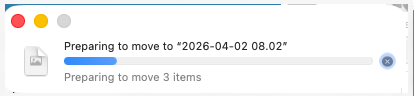 But dialogs can show up at all sorts of operations, as long as involving Finder, Dropbox, and ‘raw’ GFiber
RESOURCES
- (Private-access-only: chatgpt.com/c/69cec628-2970-8332-9faa-5fd176bd9327)
- (Private-access-only: Dropbox Proxy configration – chatgpt.com/c/6a58d7b6-e5e8-83ea-914b-a6fb1ad74188, the discussion coming up with Cloudflare WARP)
- Protocols, OSI Model – jandp.biz/is/apps/macos/finder/preparing-to/protocols-osi-model/
- Scratchpad – preparing-to/scratchpad/
SOLUTIONS
Short-Term / NOT permanent fixes
Going into VPN is what’s been used for the last few months, since April 2026.
- Using VPN, using since April 2026
- Prose:
- IS a working solution, i.e. CAN use Finder to move files around filesystem
- CONS: sites that doesn’t allow being on VPN, e.g.
- Banks (e.g. SEB)
“Det verkar som du är uppkopplad via VPN, Tor eller liknande anonymiseringstjänst. Du kommer därför inte kunna utföra alla typer av bankärenden. För att få tillgång till alla tjänster behöver du logga in utan en sådan uppkoppling. Kontakta oss om du behöver hjälp.” - YouTube TV – get “VPN / Proxy Detected”, “To continue, turn off your VPN/Proxy. This will allow YouTube TV to locate the best content.”
- …
- Banks (e.g. SEB)
- Prose:
- Using Cloudflare WARP, realized Thu 2026-07-16 after getting hint to try Cloudflare WARP while discussing problems with ChatGPT.
Note: INSTEAD of VPN, NOT together, as creates conflicts, so far fail to start VPN- Pros:
- Banks – DOES work,### ###
- DOES work with YouTube TV
- ###
- Cons:
- Can’t use VPN as well, so need to Stop Cloudflare and Start VPN when really DO want to use VPN.
- Apple’s Private Relay becomes Unavailable
- Pros:
Long-Term / Permanent fixes
- BEST would be if could get back working functionality of
Finder + Dropbox + Google Fiber, as before April 2026.
I.e. figure out what the heck happened, and why ‘raw’ Google Fiber is ONLY common denominator. (Using other or modified WAN, like cell phone or VPN removes problem.) - Creating a whole brand-new user ALSO seems to fix problem.
- Risk is however that problem maybe arise again, for this new user.
- ??? Reinstall macOS 26.5 as clear installation
- ??? Try macOS 27, only Beta yet – really RISKY as many other areas may fail, including own apps/tools/utilities/ ….
- …
FROM CHATGPT
See also chats mentioned above. Below is merged from two documents created by ChatGPT – Engineering_Report_Finder_Dropbox_GFiber.docx (2026-07-14 16:59) and Engineering_Report_v2_Dropbox_Finder_GFiber.docx (2026-07-14 17:00).
1. Executive Summary
A reproducible Finder performance problem was investigated. The delay affects Finder operations into Dropbox-managed folders only when the Mac uses a direct Google Fiber Internet connection. The same Mac, Dropbox installation, and files work normally over a VPN using Google Fiber and over an unrelated cellular WAN. Command-line operations (mv, cp, ditto) are unaffected.
2. Environment
- macOS 26.4 and macOS 26.5 (25F71)
- Started after upgraded to 26.4: 2026-04-02 06.09.21 macOS Tahoe 26.4 Update
- Dropbox using Apple’s File Provider architecture
- Google Fiber primary ISP
- VPN over GFiber eliminates symptom
- Cellular hotspot also eliminates symptom
3. Symptom Characterization
Observed delays:
- E.g. PROBLEM: Local → Dropbox move: typically 20–50 s.
- E.g. PROBLEM: Delete of Dropbox folders: up to ~33 s.
- Delay independent of file size.
- Dropbox frequently reports ‘Syncing…’ while Finder still displays ‘Preparing…’.
- Terminal operations complete immediately. I.e.
- Command Line Interface (CLI) operations are always executing very fast, no delays.
- Graphical User Interface (GUI; macOS Finder): when problems is seen, dialog popping up for 20-50 seconds (showing (e.g.) Preparing to move… dialog)
4. Experiments Performed
- Little Snitch eliminated. (local, computer desktop, firewall)
- IPv6 disabled.
- DNS compared.
- MTU changed to 1420 (no effect).
- Finder/fileproviderd/filecoordinationd/DropboxFileProvider sampled.
- Unified logs collected.
- NetworkQuality compared.
- TCP sessions monitored.
- Dropbox DNS endpoints compared with and without VPN.
5. Findings
- Finder samples consistently showed waits inside DesktopServices/NSFileCoordinator.
- fileproviderd showed Dropbox metadata enumeration and SQLite activity.
- DropboxFileProvider appeared mostly idle during captured stalls.
- TCP captures showed established HTTPS sessions with no retransmissions or reconnect storms during the delay.
- DNS returned identical Dropbox endpoint IPs with and without VPN.
6. Eliminated Hypotheses
- Disk performance
- File size dependency
- Little Snitch
- Basic DNS latency
- MTU mismatch
- General Internet bandwidth
- Dropbox upload throughput
- APFS corruption
7. Remaining Hypotheses
A. Google Fiber routing/peering interaction with Dropbox control plane.
B. Dropbox backend behavior associated with the direct GFiber public IP.
C. Apple File Provider metadata reconciliation triggered by Dropbox state reached only on the direct GFiber path.
D. Finder/DesktopServices regression exposed only under this network condition.
8. Architectural Interpretation
Finder (DesktopServices copy engine)
↓
NSFileCoordinator
↓
filecoordinationd
↓
fileproviderd
↓
Dropbox File Provider
↓
Dropbox Cloud
The visible delay occurs while Finder waits for coordinated access. The captured evidence places the stall downstream of Finder but upstream of completion of File Provider coordination.
9. Why the VPN Matters
The VPN changes the network path and public identity while leaving the Dropbox application, filesystem and operating system unchanged. Because a cellular WAN also resolves the problem, the evidence points toward a direct-GFiber-specific interaction rather than a purely local software defect.
10. Recommended Engineering Actions
- Collect simultaneous packet captures on direct GFiber and VPN.
- Compare TLS sessions and long-lived notification connections.
- Investigate File Provider enumeration timing under identical workloads.
- Escalate to Dropbox engineering with stack samples.
- File Apple Feedback including Finder, fileproviderd and filecoordinationd samples.
11. Confidence Assessment
High confidence:
– Finder is waiting in coordinated file operations.
– CLI tools bypass the problematic path.
– Direct GFiber is a necessary condition.
Medium confidence:
– The trigger is network-path dependent rather than upload performance.
Open question:
– Which specific Dropbox control-plane interaction causes File Provider metadata reconciliation to stall only on the direct GFiber path?