
- jandp.biz/is/macos/setting-up-macos/
- Dropbox
- How to connect the Dropbox desktop app to a proxy server
help.dropbox.com/installs/connecting-through-proxy - (Private access only – Dropbox-related, how to use a proxy server – chatgpt.com/c/6a58d7b6-e5e8-83ea-914b-a6fb1ad74188 ID: 20260716073500)
- what brought me looking into Cloudflare WARP (next).
- How to connect the Dropbox desktop app to a proxy server
- Cloudflare WARP
- search.brave.com/search?q=Cloudflare+WARP
- search.brave.com/search?q=what+is+Cloudflare+WARP
- search.brave.com/search?q=cloudflare+warp+for+personal+use+review
- Cloudflare WARP client
developers.cloudflare.com/warp-client/ - WARP modes
developers.cloudflare.com/warp-client/warp-modes/ - Cloudflare WARP 2026 review, a year later.
shamvoke.com/blog/cloudflare-warp-review-a-year-later - Download Cloudflare One Client stable releases
developers.cloudflare.com/cloudflare-one/team-and-resources/devices/cloudflare-one-client/download/ - Cloudflare One Client
developers.cloudflare.com/cloudflare-one/team-and-resources/devices/cloudflare-one-client/
Extract from shamvoke.com/blog/cloudflare-warp-review-a-year-later
Why not use a VPN
Trust me, I’ve been down that road.
For daily, general internet usage, VPNs sound great on paper until websites realize you’re using one.
Then the complaints begin.
Some services ask for endless verification.
Social platforms become especially suspicious, sometimes flagging unusual activity simply because your connection suddenly appears halfway across the globe.
And let’s not even talk about free VPN services. Most come with data limits, speed restrictions, crowded servers. Not the way to go.
Except Proton VPN. That one earned my respect, stable, usable, and not trying to frustrate you into upgrading.
Just so we are on the same page, WARP is not a full replacement for a VPN, there are still situations where a VPN is the better tool.
Why not use a Proxy
To be honest, proxies are a solid solution if you pay for them. I repeat, a solid solution. Keep in mind the focus here is daily general usage, Just WARP it.
If you choose free proxies, they are usually slow, unreliable, overloaded, or all three at once.
That’s what made WARP interesting for daily usage.
- It’s free.
- It’s unlimited.
- No login required.
Cloudflare WARP Vs VPN
One thing I love the most about WARP, unlike most VPNs I’ve tested, websites rarely complain when I’m using it.
- No endless CAPTCHAs.
- No suspicious login warnings.
- No constant battle trying to convince websites that I’m a real human.
Install, turn it on and forget it exists.
For me, that’s exactly how a networking tool should work.
…
| Local/e.g. User’s Home | GFiber WAN central connection point | “Actual” destinations out on the Internet | At destination, e.g. Dropbox | |||
| Layer | Local Computer (macOS) |
‘Case 1’ Std GFiber |
||||
| 7 Appl. | ! DNS, if use Google’s (not strictly true, not ‘same’ servers) | ! File system services | ||||
| 6 Pres. | ! | ! | ||||
| 5 Sess. | ! | ! | ||||
| 4 Trsp. | ! ?Yes~, Flow control, .. | ! | ||||
| 3 Netw. | (below) | ! Yes, Routing -> | ->! | ! | ||
| 2 D-L | (below) | ! Yes, req. | ! | ! | ||
| 1 Phys. | Wi-Fi –> | Wi-Fi AP incl. Router from Google / GFiber | Modem from GFiber –> | ! Yes, req. | !–> | ->! IN/OUT |
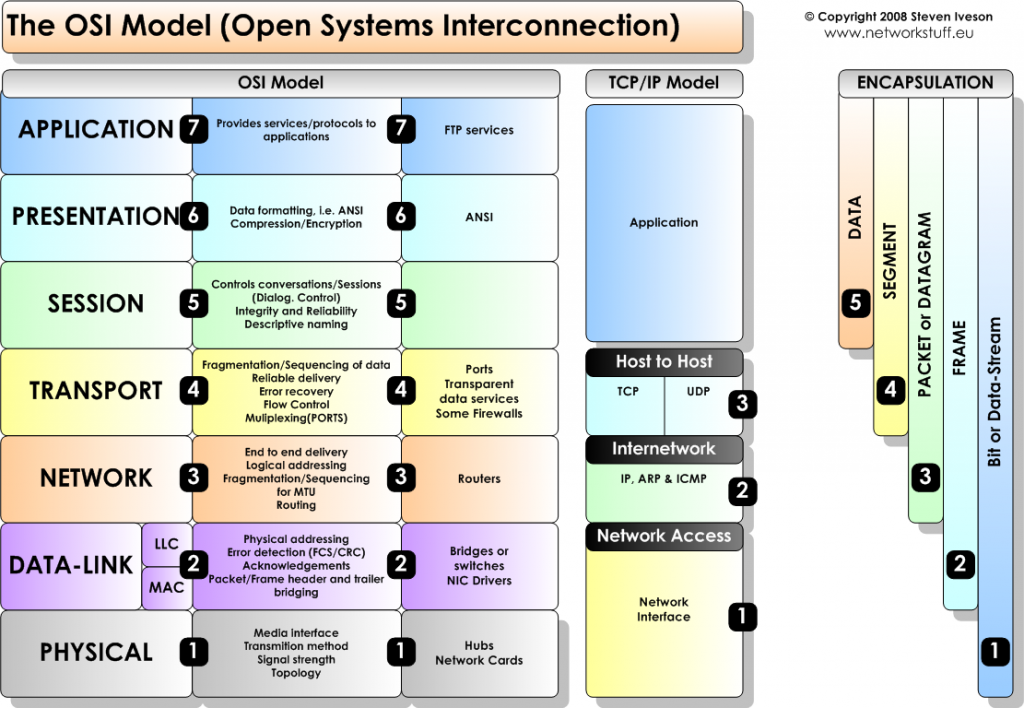
| Layer | Local Computer (macOS) |
‘Case 1’ Std GFiber |
||||
| 7 Appl. | HTTP | HTTPS | ! DNS, if use Google’s (not strictly true, not ‘same’ servers) | ! File system services | ||
| SSL, TLS | ||||||
| 6 Pres. | ! | ! | ||||
| 5 Sess. | ! | ! | ||||
| 4 Trsp. | TCP, UDP | ! ?Yes~, Flow control, .. | ! | |||
| IPsec | ||||||
| 3 Netw. | IP | (below) | ! Yes, Routing -> | ->! | ! | |
| 2 D-L | (below) | ! Yes, req. | ! | ! | ||
| 1 Phys. | Wi-Fi –> | Wi-Fi AP incl. Router from Google / GFiber | Modem from GFiber –> | ! Yes, req. | !–> | ->! IN/OUT |